Report
The Report class combines data source (that provides report data), report output (that knows how to create the output file) and sections (that defines how to create a part of the document).
It allows you to generate a report file for a given report type (e.g. "Motor Fleet", "Generic Machine Asset") using default or custom report variant.
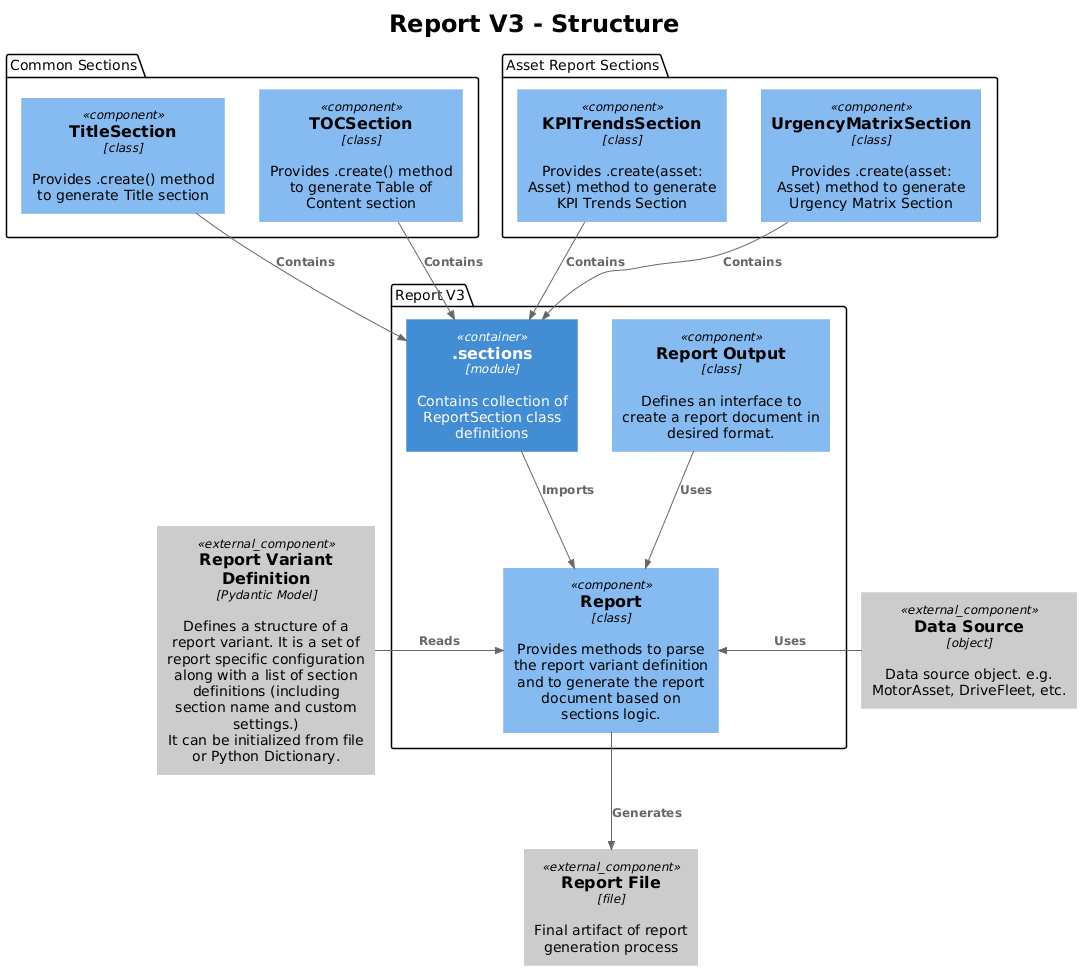
Components
The base class for report objects is smartreport.v3.report.report.Report
It defines methods for report generation, section management and settings handling.
Each new report type class should inherit from it.
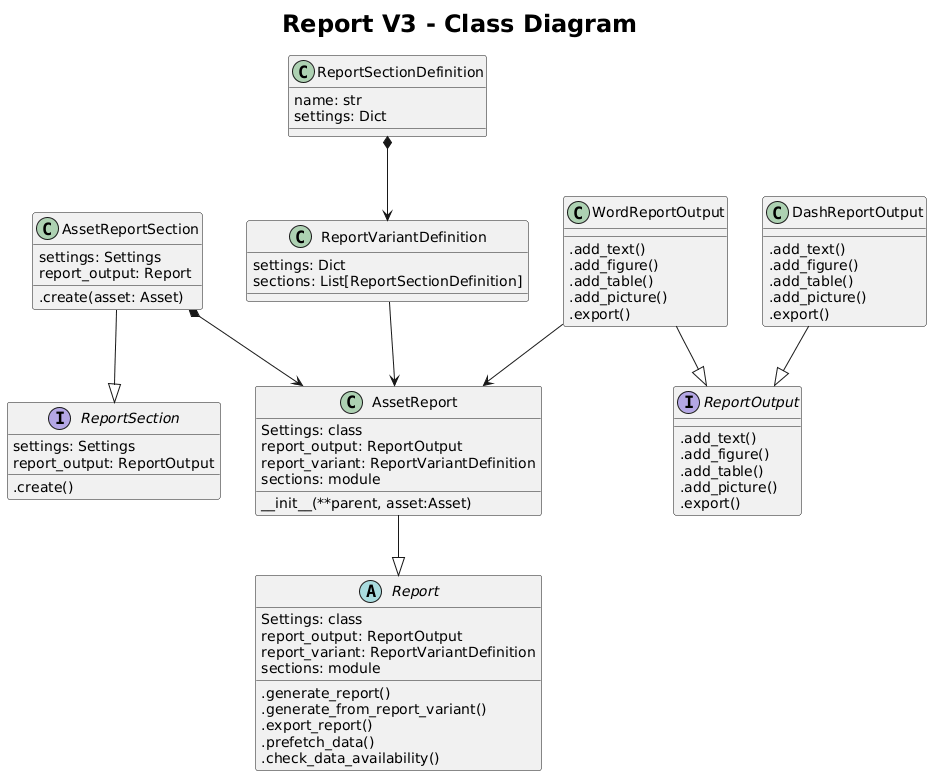
Settings
The report has a collection of report wide settings, defined in the internal class called Settings. It is based on Pydantic models and provides a way to store and access the settings useful in the context of the whole report.
Example of report-wide settings are for example DEFAULT_REPORT_VARIANT_PATH or MEASUREMENT_MODE
(which defines which measurements should be obtained from the asset data source) for the Asset reports.
Report settings can be accessed from each section via .report_settings attribute.
Data prefetching and availability check
Prior to report generation it is possible to prefetch the report required data.
Each report type can implement prefetch_data method that should efficiently download all the data
required by the report to create the document.
In general the report methods are utilizing dedicated methods in data reader objects to achieve it. For example, Smart Sensor reports benefit from calling a dedicated SmartSensor API endpoint that provides data for multiple assets/kpis at once, highly reducing the data retrieval part.
Additionally, each report can implement the check_data_availability methods that should verify the amount
of available data by comparing it against the provided threshold.
In general the report methods are utilizing dedicated methods in data reader objects to achieve it.
Generating report
The standard way to generate the report is to call .make_report(variant, filepath) method on the Report object.
That will trigger the report generation process.
If filepath is provided, it will automatically export the report when the generation is done.
Otherwise, you can simply call the .export_document() method.
Sometimes there is a need to track the progress of report generation and to have access to the currently
processed section. This can be achieved by using the .generate_report_from_variant() generator.
You can use it with for loop like to get the progress and section name being processed.
from smartreport.v3.reports.report import Report

report = Report(report_output="json")

for progress, section_name in report.generate_report_from_variant():
    print(f"{progress}, {section_name}")
report.export_document(filepath=r"D:\TMP\TestReport.json")
Defining the new report type
Before you create a new report type class go through this checklist:
- All required data source handling object are available (e.g. MotorAsset, JobMeasurement, DriveFleet, etc.)
- All section classes that define how to create each part of your report are implemented and imported in the sections' submodule.
- We know which sections' setting defaults should be the overriden.
We start from creating new class inheriting from smartreport.v3.report.report.Report importing all needed sections
and defining the report level settings.
Then we can override all needed section setting defaults by specifying them in the SECTION_DEFAULTS class attribute.
This step is not required, but it simplifies the creation of the report variant files.
Finally, we can overload the section __init__ to require the report specific data sources in the constructor.
We should include all the data sources that are needed by any of the report sections possibly used.
Important
The name of the attribute in report class should match the name of the parameter required by session's
.create()method.e.g. If the session has
.create(asset: MotorAsset, service_log: ServiceLog)signature, we should defineasset: MotorAssetandservice_log: ServiceLogattributes in the NewReport class.
from smartreport.v3.reports.report import Report
from smartreport.datatypes.asset import MotorAsset


class NewReport(Report):
    from smartreport.v3.reports.new_report import sections

    class Settings(Report.Settings):
        DEFAULT_REPORT_VARIANT_PATH = r"D:\TMP\new_report_default_variant.json"
        INCLUDE_MACHINE_LEARNING: bool = True
        REPORT_AUTHOR: str = "FM"

    settings: Settings  # add this to improve type hinting in your IDE

    SECTION_DEFAULTS = {
        "Title": sections.TitleSection.Settings(SUB_TITLE="New Super Report"),
        "MachineLearningPredictions": sections.MachineLeariningPredictionsSection.Settings(
            PREFERED_ALGORITHM="laplace"),
    }

    def __init__(
            self,
            asset: MotorAsset,
            report_output,
            report_variant=None,
            settings=None,
    ):
        super().__init__(report_output=report_output, report_variant=report_variant, settings=settings)

        self.asset = asset

    def prefetch_data(self, **kwargs) -> None:
        self.asset.prefetch_trends(kpi_ids=self.settings.TRENDS_TO_PREFETCH, **kwargs)

    def check_data_availability(self, threshold: float, **kwargs) -> bool:
        data_availability = self.asset.calculate_data_availability(kpi_ids=self.settings.TRENDS_TO_PREFETCH, **kwargs)
        return data_availability >= threshold
To generate the new report, we have to initialize it with the data source and the report output
(and optionally with custom variant and settings).
Later we can call the .make_report() to generate and the report and export it to a file.