Home
SmartReport is a Python package that provides full set of tools to generate analytics reports for both SmartSensor and Drive assets monitored and covered by Motion Analytics community.
Components
SmartReport package includes connectors to external services with data used by the reports, data structures to handle this data, and calculation formulas that helps with processing and analysing the data.
Additionally, it provides plotting functions that can be used to visualize the data, tools for generating the report files in various formats (Word, interactive HTML and JSON), and finally the definitions of the supported report types.
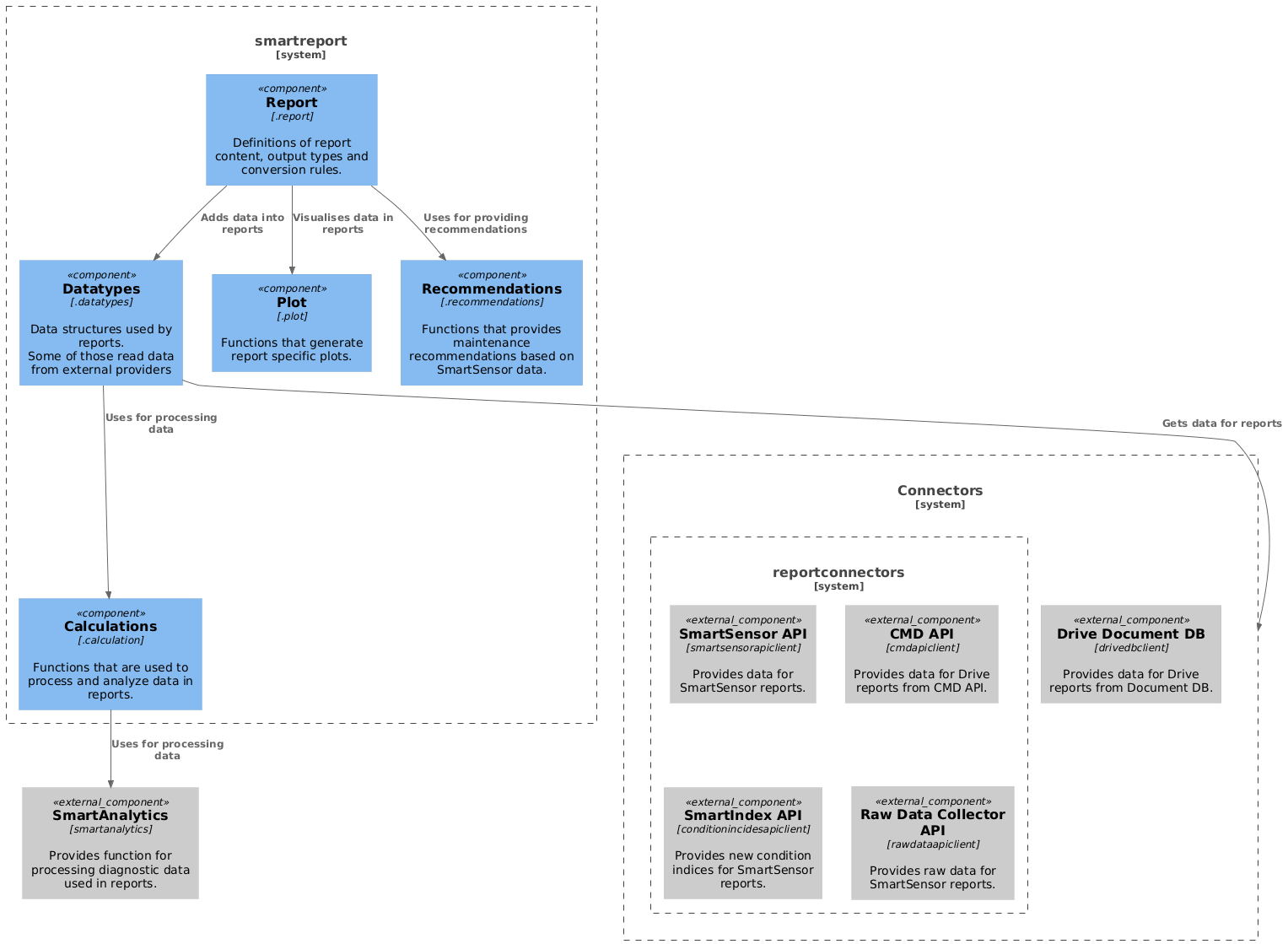
For the details on each of the components, please refer to the links below.
Deployment
For the details on the deployment process, please refer the following document Deployment Overview
IMPORTANT
This package doesn't provide any user interface for the report generation process, but it is intended to be used as a part of user facing application that provides it.
Currently, there are two active application that are using it:
ReportWebClient > Internal web service that provides a web browser based report generation interface for the ABB experts
ReportAzureFunction > Azure cloud-hosted web service that provides REST API based report generation interface for SmartSensor backend, > that is later used on SmartSensor portal to provide access to the reports to the ABB customers.
Alternatively, you can run a simple scripts from
/examplesfolder. Please refer to Local report generation document for details.
Development
Development activities results are tracked in Changelog file,
and the current version of app is defined in smartreport.__init__.__version__.
Testing is an essential part of development process. There is a unit test suite available in /tests folder,
and regression tests in /regression_tests. Details on how to configure and perform testing can be found
Testing document.
To simplify development process there is a set of python scripts available in the /examples folder that
contains scripts to generate an example version of each available report type and scripts request external data.
You can also find a basic implementation of Dash server that allows to open and explore interactive report files there.
For details on how to prepare and perform report generation in local environment please refer to Local report generation document.