Asset
Introduction
AssetDataReader is an interface that declares methods for reading all the data important for an Asset in the reporting context. Some of those methods are described below, for all please refer to the API section
get_raw_measurements(asset_id, start_date, end_date, mode)- returns a list of RawDataMeasurement objects that were collected between start_date and end_date for Asset with asset_id.find_raw_measurements(asset_id, start_date, end_date, mode)- returns the list of raw measurements found for Asset with asset_id between start_date and end_date. It does not fetch the measurement content from the API.get_threshold(asset_id, symbolic_name)- returns a Threshold object for given symbolic_name from Asset with asset_idget_trend(asset_id, symbolic_name, start_date, end_date)- returns a Trend object with values for a given symbolic_name from Asset with asset_id, start_date and end_date.get_algorithm_results(asset_id, algorithm_name, start_date, end_date)- returns a pandas DataFrame with the algorithm results for a given algorithm_name from Asset with asset_id between start_date and end_date.get_asset_details(asset_id)- returns the full set of asset related details, like asset properties, sensor data, asset type and asset's organization details.get_asset_property(asset_id, property_key)- returns the value of the property with property_key for Asset with asset_idhas_access(asset_id)- returns True if the user has access to the Asset with asset_idget_bearing_frequencies(manufacturer, model)- returns BearingData for a given manufacturer and model
There are two implementations of AssetDataReader available: PowertrainAPIAssetDataReader and MockAssetDataReader.
PowertrainAPIAssetDataReader uses PowertrainReportAPIClient to get data from one of many Powertrain APIs'
microservices. It uses dedicated meta-API called Report API that combines data from FileServiceAPI, TimeseriesAPI,
AssetAPI, OrganizationAPI, and AnalyticsAPI.
Bearing frequencies data is also fetched from the same API client, but it's handled by a separate reader. The reason for that is to allow the access to the bearing data without the need to initialize the AssetDataReader. It's used when generating the Offline Measurement Report, from local raw measurement files.
Finally, MockAssetDataReader is used for testing purposes and returns randomized data. Seed parameter can be used to make the data deterministic.
NOT UP TO DATE
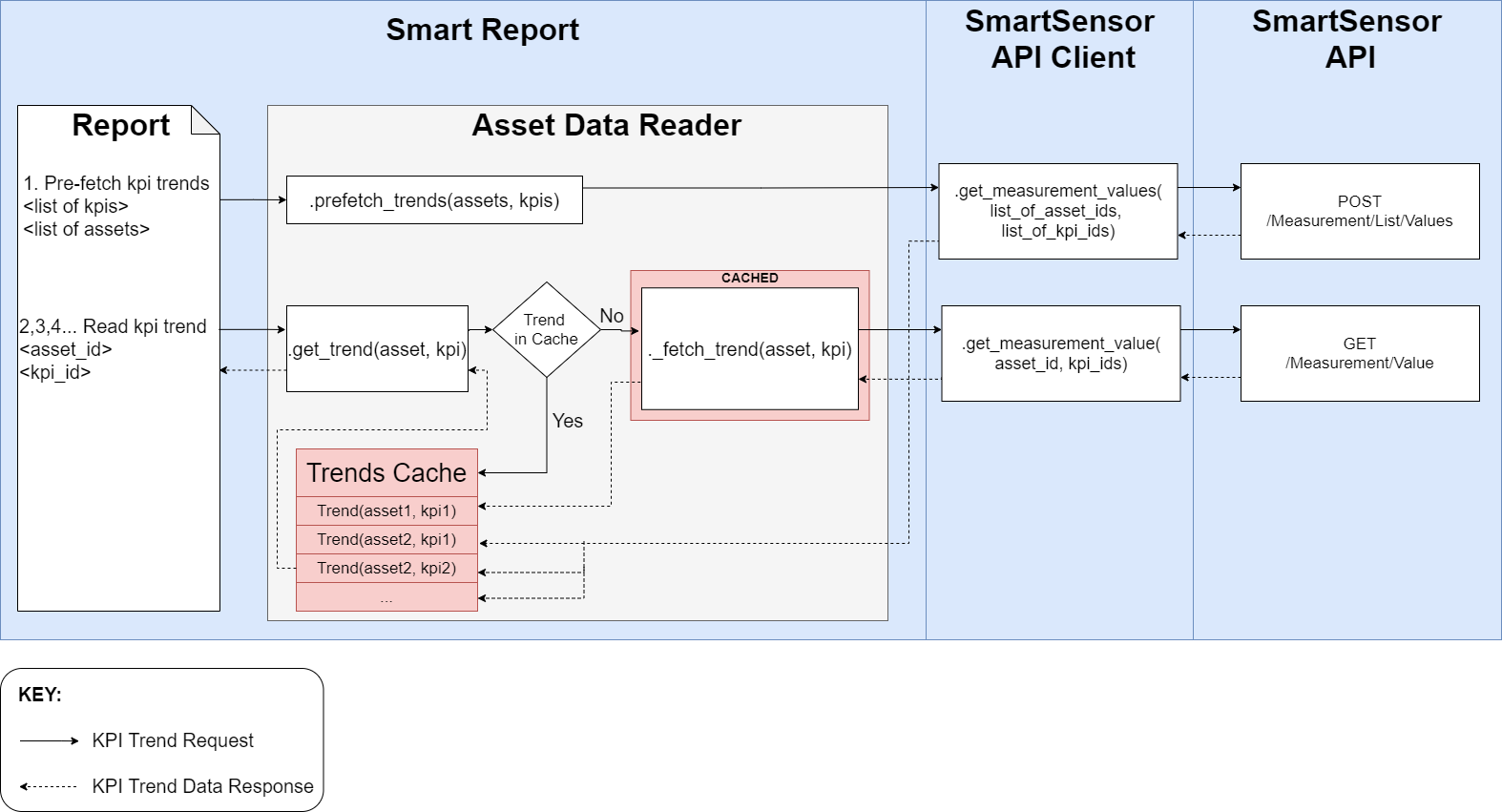
Since this data is read from external sources (which is a time-consuming process), caching is implemented. By default, standard
@lru_cachedecorator is used on data fetching methods. However, for Trend fetching that is not enough and custom LRU cache is implemented.
API
smartreport.v3.readers.asset.AssetDataReader
get_algorithms_overview(asset_id, start_date, end_date)
abstractmethod
Returns an overview of algorithms run on the asset within the specified date range.
Parameters:
| Name | Type | Description | Default |
|---|---|---|---|
asset_id
|
int
|
The ID of the asset. |
required |
start_date
|
datetime
|
The start date for the overview. |
required |
end_date
|
datetime
|
The end date for the overview. |
required |
Returns: AnalyticsAlgorithmsOverview: An overview of algorithms run on the asset.
prefetch_data(asset_ids, start_date, end_date, symbolic_names, algorithm_names, **kwargs)
abstractmethod
Returns time taken to prefetch data.
smartreport.v3.readers.asset.powertrain.PowertrainAPIAssetDataReader
Bases: AssetDataReader
__init__(report_api_client, **kwargs)
Initializes the PowertrainAPIAssetDataReader. It requires an authenticated instance of PowertrainReportAPIClient.
Notes
In future we should get by with only one client (ReportAPI), but for now, we need all. Because the Organization API and Asset API clients have some endpoints that are not yet implemented in the Report API.
Parameters:
| Name | Type | Description | Default |
|---|---|---|---|
report_api_client
|
PowertrainReportAPIClient
|
PowertrainReportAPIClient instance |
required |
Other Parameters:
| Name | Type | Description |
|---|---|---|
unit_standard |
UnitStandard
|
Unit standard |
find_raw_measurements(asset_id, start_date, end_date)
Returns the raw measurements found for a given asset and time range.
It does not download the files, only returns the overview of the found raw measurements.
Can be used to get the list of raw measurements and then download the selected files.
Parameters:
| Name | Type | Description | Default |
|---|---|---|---|
asset_id
|
int
|
Asset ID |
required |
start_date
|
datetime
|
Start date |
required |
end_date
|
datetime
|
End date |
required |
Returns:
| Type | Description |
|---|---|
RawMeasurementsFound
|
RawMeasurementsFound object which contains the overview of the found raw measurements. |
from_access_token(access_token, api_url='https://api.powertrain.abb.com', **kwargs)
staticmethod
Creates the PowertrainAPIAssetDataReader from the provided CIAM access token. This method creates all needed Powertrain API clients (Report API and Organization API) and then initializes the PowertrainAPIAssetDataReader. It's the most convenient way to create the reader, but it requires the CIAM access token.
Parameters:
| Name | Type | Description | Default |
|---|---|---|---|
access_token
|
str
|
Access token to the Powertrain API on the given environment. |
required |
api_url
|
str
|
Powertrain API URL. Default: |
'https://api.powertrain.abb.com'
|
Other Parameters:
| Name | Type | Description |
|---|---|---|
ciam_api_url |
str
|
CIAM API URL. If not provided, it is guessed based on the |
validate |
bool
|
If true then the token would be validated against the CIAM. |
Returns:
| Type | Description |
|---|---|
PowertrainAPIAssetDataReader
|
PowertrainAPIAssetDataReader instance |
get_algorithm_results(asset_id, algorithm_name, start_date, end_date)
Gets algorithm results from the Analytics API.
Parameters:
| Name | Type | Description | Default |
|---|---|---|---|
asset_id
|
int
|
Asset ID |
required |
algorithm_name
|
str
|
Algorithm name |
required |
start_date
|
datetime
|
Start date |
required |
end_date
|
datetime
|
End date |
required |
Returns:
| Type | Description |
|---|---|
DataFrame
|
Algorithm results |
get_algorithms_overview(asset_id, start_date, end_date)
Returns an overview of algorithms run on the asset within the specified date range.
Parameters:
| Name | Type | Description | Default |
|---|---|---|---|
asset_id
|
int
|
The ID of the asset. |
required |
start_date
|
datetime
|
The start date for the overview. |
required |
end_date
|
datetime
|
The end date for the overview. |
required |
Returns: AnalyticsAlgorithmsOverview: An overview of algorithms run on the asset.
get_asset_details(asset_id)
Gets the asset details for the given asset ID. It fetches the asset details from the Asset API and the Organization API and then merges them together.
Parameters:
| Name | Type | Description | Default |
|---|---|---|---|
asset_id
|
int
|
Asset ID |
required |
Returns:
| Type | Description |
|---|---|
AssetDetails
|
AssetDetails object |
get_asset_property(asset_id, property_key)
Gets the asset property for the given asset ID and property key.
Parameters:
| Name | Type | Description | Default |
|---|---|---|---|
asset_id
|
int
|
Asset ID |
required |
property_key
|
str
|
Property key |
required |
Returns:
| Type | Description |
|---|---|
Optional[AssetProperty]
|
AssetProperty object if the property is found, otherwise None. |
get_raw_measurements(asset_id, start_date, end_date, mode, **kwargs)
Gets the raw measurements for a given asset and time range.
First it looks for the raw data files attributes in the File Service API. Then it filters the found files based on the provided mode. Finally, it downloads the selected files (as CSVs) and converts them to the JobMeasurement objects.
TODO
- Add sensor data to the measurement parameters
Parameters:
| Name | Type | Description | Default |
|---|---|---|---|
asset_id
|
int
|
Asset ID |
required |
start_date
|
datetime
|
Start date |
required |
end_date
|
datetime
|
End date |
required |
mode
|
MeasurementModes
|
Mode to select measurements. Options are "first", "latest", "sample" |
required |
Other Parameters:
| Name | Type | Description |
|---|---|---|
sample |
int
|
Number of measurements to return, when mode is "sample". Default is 5. |
sensor_codes |
List[str]
|
List of sensor codes to filter the measurements. By default all are included. |
max_workers |
int
|
Number of workers for the ThreadPoolExecutor. Default is taken from the reader. |
Returns:
| Type | Description |
|---|---|
List[RawDataMeasurement]
|
List of raw measurement objects. |
get_sensor_details(asset_id, sensor_id=None)
Gets the sensor details for the given asset ID. If the sensor_id is provided, we get the details for the specific sensor. If it's not provided, we get the sensor ID from the asset details and then get the sensor details.
Parameters:
| Name | Type | Description | Default |
|---|---|---|---|
asset_id
|
int
|
Asset ID. |
required |
sensor_id
|
Optional[int]
|
Sensor ID. If not provided, the sensor ID is taken from the asset details. |
None
|
Returns:
| Type | Description |
|---|---|
SensorDetails
|
SensorDetails |
get_threshold(asset_id, symbolic_name)
Gets the threshold for a given asset and symbolic name
It looks for the data in the timeseries config.
If the symbolic name is not found in the timeseries config, an empty threshold is returned.
Notes
For some symbolic names, the default thresholds are used. These are defined in the TIMESERIES_DEFAULT_THRESHOLDS dictionary. If the symbolic name is not found in the timeseries config, the default symbolic name is used to get the threshold.
Parameters:
| Name | Type | Description | Default |
|---|---|---|---|
asset_id
|
int
|
Asset ID |
required |
symbolic_name
|
str
|
Symbolic name of the timeseries |
required |
Returns:
| Type | Description |
|---|---|
Threshold
|
Threshold object |
get_trend(asset_id, symbolic_name, start_date, end_date)
Gets the trend for a given asset, symbolic name, and time range.
First it fetches the timeseries config and the timeseries threshold. Then it fetches the raw timeseries data from Timeseries API. Due to the API limitations, the timeseries data is split into smaller parts based on the asset type. The duration of the split is defined in the Config class. Finally, it gets the threshold for the symbolic name and uses all of the above to build the Trend object.
Parameters:
| Name | Type | Description | Default |
|---|---|---|---|
asset_id
|
int
|
Asset ID |
required |
symbolic_name
|
str
|
Symbolic name of the timeseries |
required |
start_date
|
datetime
|
Start date of the trend |
required |
end_date
|
datetime
|
End date of the trend |
required |
Returns:
| Type | Description |
|---|---|
Trend
|
Trend object if the data is found, otherwise an empty Trend object. |
has_access(asset_id, default=False, capability_name=AssetCapabilities.PUBLISH_REPORT.value)
Check if the user has access to the asset.
Parameters:
| Name | Type | Description | Default |
|---|---|---|---|
asset_id
|
int
|
Asset ID |
required |
default
|
bool
|
Default value to return if the access check fails. |
False
|
capability_name
|
str
|
Capability name to check. Default is "publishReport". |
PUBLISH_REPORT.value
|
Returns:
| Type | Description |
|---|---|
bool
|
True if the user has access to the asset, otherwise False. |
prefetch_data(asset_ids, start_date, end_date, symbolic_names, algorithm_names, **kwargs)
Prefetches the data for the given asset IDs, symbolic names, and algorithm names.
It fetches the data in parallel using the ThreadPoolExecutor. The number of workers can be set using the max_workers keyword argument, if not provided, the default is used.
The method fetches the following data for every provided asset ID:
- Asset details
- Organization details
- Asset properties
- Timeseries config
- Raw timeseries attributes in the given time range, split into smaller parts based on the asset type
- Timeseries data for the given symbolic names in the given time range
- Algorithm results for the given algorithm names in the given time range
Parameters:
| Name | Type | Description | Default |
|---|---|---|---|
asset_ids
|
Sequence[int]
|
List of asset IDs |
required |
start_date
|
datetime
|
Start date |
required |
end_date
|
datetime
|
End date |
required |
symbolic_names
|
Sequence[str]
|
List of symbolic names |
required |
algorithm_names
|
Sequence[str]
|
List of algorithm names |
required |
Other Parameters:
| Name | Type | Description |
|---|---|---|
max_workers |
int
|
Number of workers for the ThreadPoolExecutor. Default is taken from the reader. |
asset_type |
AssetType
|
Asset type. Default is UNKNOWN. |