SmartSensor recommendations
Overview
The SmartSensor Recommendations provides a list of automatic text recommendations for the expert users to follow. The recommendations are based on the analysis of KPI values and thresholds in the reporting period.
Recommendations are computed only for the Motor Assets.
Each recommendation has a recommendation text and the importance level. The Importance level might be either LOW or HIGH, with the idea that the low importance recommendations should be handled within 4-6 months, while the high importance recommendations should be handled under 3 months.
General algorithm
Each recommendation is based on a single timeseries data derived from the Asset KPI. The only exception is the UrgencyLevel recommendation, which is based on the combination of two Asset KPIs.
The timeseries we use for the recommendation is the range (report_start_date - 7 days) to report_end_date
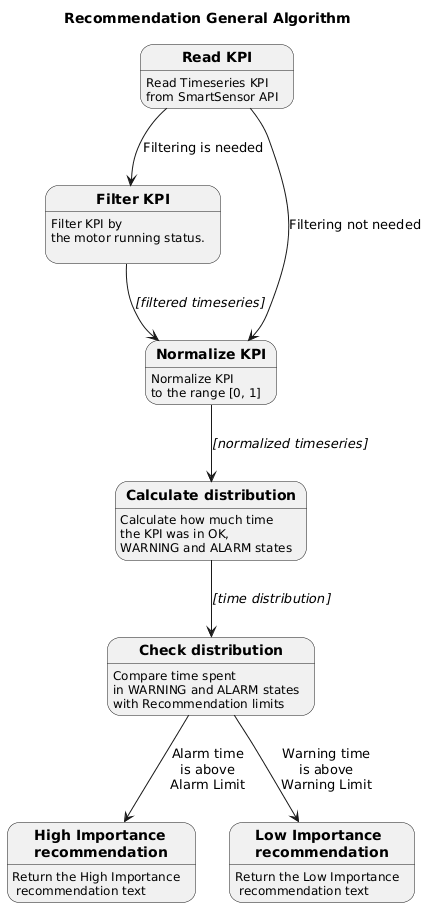
The recommendation is based on the following logic:
- Get the timeseries data, required by the recommendation.
- Optional. Filter it with motor running signal.
- Normalize the timeseries, so its values are in the range [0, 1].
- Calculate the time spent in alarm and warning states.
- Check if time spent in alarm state is above the alarm limit. If so return the HIGH Importance.
- Check if time spent in warning state is above the warning limit. If so return the LOW Importance.
Recommendation details used in Fleet Report
Temperature
KPI
- Skin Temperature (KPI_ID = 4)
Filtering
- No filtering
Limits
- Warning Limit =
10 % - Alarm Limit =
10 %
Texts
- Low Importance =
Perform a thermographic inspection during the walkdown inspection. - High Importance =
Perform a thermographic inspection during the walkdown inspection.
TemperatureEnvironmentalIndex
KPI
- Skin Temperature (KPI_ID = 4)
Filtering
- Motor is not running
Limits
- Warning Limit =
20 % - Alarm Limit =
20 %
Texts
- Low Importance =
Motor is not designed for ambient conditions - High Importance =
Motor is not designed for ambient conditions
VibrationOperationalIndex
KPI
- Overall Vibration (KPI_ID = 8)
Filtering
- Motor is running
Limits
- Warning Limit =
15 % - Alarm Limit =
15 %
Texts
- Low Importance =
Perform detailed remote analysis to verify high vibration causes - Generate Asset Report or Perform detailed vibration analysis on site - High Importance =
Perform detailed remote analysis to verify high vibration causes - Generate Asset Report or Perform detailed vibration analysis on site
VibrationOperationalOtherIndex
KPI
- Overall Vibration (KPI_ID = 8)
Filtering
- Motor is running
Limits
- Warning Limit =
10 % - Alarm Limit =
10 %
Texts
- Low Importance =
Check gearbox vibrations. Check driven equipment vibrations - High Importance =
Check gearbox vibrations. Check driven equipment vibrations
VibrationEnvironmentalIndex
KPI
- Overall Vibration (KPI_ID = 8)
Filtering
- Motor is not running
Limits
- Warning Limit =
10 % - Alarm Limit =
10 %
Texts
- Low Importance =
Reduce foundation transmitted vibrations. Rotate shaft every two weeks - High Importance =
Reduce foundation transmitted vibrations. Rotate shaft every two weeks
MisalignmentOperationalIndex
KPI
- Simple Misalignment (KPI_ID = 66)
Filtering
- Motor is running
Limits
- Warning Limit =
15 % - Alarm Limit =
15 %
Texts
- Low Importance =
Perform detailed remote analysis to verify high vibration causes - Generate Asset Report. Check for misalignment, soft foot and vibrations coming from coupled load. - High Importance =
Perform detailed remote analysis to verify high vibration causes - Generate Asset Report. Check for misalignment, soft foot and vibrations coming from coupled load.
BearingReliabilityIndex
KPI
- Bearing Condition (KPI_ID = 27)
Filtering
- Motor is running
Limits
- Warning Limit =
10 % - Alarm Limit =
20 %
Texts
- Low Importance =
Perform detailed remote vibration analysis to verify bearing defects - Generate Asset Report - High Importance =
Replace bearings
RegreasingReliabilityIndex
KPI
- Regreasing Advice (KPI_ID = 65)
Filtering
- Motor is running
Limits
- Warning Limit =
30 % - Alarm Limit =
30 %
Texts
- Low Importance =
Regrease bearings or update the date of regreasing - High Importance =
Regrease bearings or update the date of regreasing
VFDVibrationOperationalIndex
KPI
- Overall Vibration (KPI_ID = 8)
Filtering
- Motor is running
- Motor is connected to VFD
Limits
- Warning Limit =
10 % - Alarm Limit =
10 %
Texts
- Low Importance =
Change speed to reduce structural vibrations - High Importance =
Change speed to reduce structural vibrations
UrgencyLevelTest
Logic
This one has a custom logic. First we calculate the position on the urgency matrix at the beginning and the end of the reporting period.
There are three recommendations states, all with High importance:
-
If the both positions are outside the
Alarm Limit Radius, and the end position is worse than the start position, we return the recommendationAlarm Worsening -
If the end position is outside the
Alarm Limit Radius, and the start position is outside theWarning Limit Radius, we return the recommendationWarning to Alarm -
If the end position is outside the
Alarm Limit Radius, but the start position is OK, we return the recommendationOK to Alarm
KPI
- Total Stress (Internal KPI, used on Urgency Matrix)
- Reliability Index (Internal KPI, used on Urgency Matrix)
Filtering
- Motor is running
Limits
- Warning Limit Radius =
50 % - Alarm Limit Radius =
95 %
Texts
- OK to Alarm =
Ensure spare bearings are in stock - Warning to Alarm =
Ensure spare motor is available - Alarm Worsening =
Replace motor at the next outage
Recommendation details not used in Fleet Report
FanGrille
KPI
- Skin Temperature (KPI_ID = 4)
Filtering
- Motor is running
- Motor application is FAN
Limits
- Warning Limit =
15 % - Alarm Limit =
15 %
Texts
- Low Importance =
Clean fan grille - High Importance =
Clean fan grille
TestCheck
KPI
- Overall Vibration (KPI_ID = 8)
Filtering
- Motor is running
Limits
-
OK Limit =
90 % -
Texts
-
Low Importance =
Everything is OK, and all data is present. - High Importance =
Everything is OK, and all data is present.